facebook ad library tool
Facebook Ad Library Tool: What It Shows and What It Hides
Learn how a Facebook Ad Library Tool works, how to run competitor ad research step by step, and which spend and performance data it never shows.
Updated November 25, 2026
The popular advice is to find a competitor's longest-running ad and copy the winner. That skips the most important question: what evidence makes it a winner? A Facebook Ad Library tool can help you inspect an advertiser's messaging, creative and destinations, but public visibility isn't a profit report.
The better approach is to separate what you observed, what you infer and what you can't verify. Then preserve those observations so your next comparison measures changes in advertising, not changes in your search method.
Table of Contents
- What a Facebook Ad Library Tool Shows You
- Official Library and Third-Party Tools
- Lag, Retention and Platform Limits
- How to Run Competitor Research in the Ad Library
- Reading Ad Records Without Overreading Them
- Building a Dataset You Can Audit Over Time
- Set Up Your First Competitor Watchlist
What a Facebook Ad Library Tool Shows You
A Facebook Ad Library tool lists active ads and eligible archived ads using the fields Meta publishes. For ecommerce research, its strongest evidence is the advertisement itself: who published it, what it says, how it looks and where it sends visitors. Historical availability and financial disclosures follow different rules from ordinary commercial-ad visibility.
The archive began as a transparency system. PPC Land's account of the Ad Library records its launch on May 24, 2018, for U.S. political and issue advertising, and its expansion to all active advertisements on March 28, 2019. That expansion made the same public infrastructure useful for inspecting commercial advertising, without turning it into an advertiser's private reporting dashboard.
Visible ad fields in a Facebook Ad Library search
| Field | What it tells you | Shown for commercial ads? |
|---|---|---|
| Advertiser page name | Which Page runs the ad, not necessarily the full corporate ownership structure | Yes |
| Status | Whether the record identifies the ad as currently active | Yes |
| Start date | The published start date, not a complete pause-and-resume history | Yes |
| Platforms and placements | The identified Meta surfaces, including Facebook and Instagram | Yes |
| Creative and copy | The visual, headline and body text available in the record | Yes |
| Landing page and call to action | Where clicks go and the button text | Yes |
| Spend range | Approximate money spent where transparency disclosures apply | No for ordinary ads; available for political and social-issue ads |
| Reach range | Estimated audience where the relevant disclosure applies | No for ordinary ads; available for political and social-issue ads |
| Conversions or ROAS | Sales or return performance | No |
Treat this as a map of record-level evidence, not a checklist of campaign results. A platform label identifies a distribution surface. It doesn't reveal how the advertiser divided budget among placements, and a start date doesn't establish uninterrupted delivery.
Read the advertisement and its destination together
An ad's creative establishes its promise; the landing page shows how the advertiser develops that promise. Record both before classifying the message as a discount offer, product demonstration, comparison or objection-handling angle.
For example, a skincare ad might emphasize ingredients while its destination emphasizes a subscription. Those are different observations about the same customer journey. Preserving both is more useful than saving the image and labeling the entire campaign “ingredient-led.”
Practical rule: Describe what a field establishes before deciding what it suggests.
Official Library and Third-Party Tools
Use Meta's official library to verify an ad record. Use a third-party workspace when you need to organize repeated checks across brands. The official interface is free and adequate for direct inspection; the reason to add another tool is workflow and store context, not access to secret conversion results.
AdLibrarySpy combines Meta creative search with ecommerce research and collaborative tracking. Every feature is free, including shop search, the ads library, Brandtracker, team workspaces, the weekly report and AI access.
Official Meta library versus AdLibrarySpy
| Criterion | Meta Ad Library | AdLibrarySpy |
|---|---|---|
| Price | Free | Free, including tracking and team workspaces |
| Search inputs | Keyword, Page and country search | Brand, niche, format, placement and country |
| Filters | Country, status and ad category | Format, country and run time |
| Store context (traffic, products, apps) | Not provided as a consolidated store profile | Traffic, products and apps per store where available |
| Ongoing tracking and alerts | No built-in competitor alerts | Brandtracker snapshots with email alerts |
| Team sharing | No shared research workspace | Shared workspaces, folders and saved ads |
| Platform coverage | Meta platforms, including Facebook and Instagram | Meta only; TikTok and Google ads aren't included |
The useful distinction is between finding an advertisement and maintaining a research process. A saved creative answers what attracted your attention. A shared folder, dated snapshot and tracked store help a colleague understand why you saved it and what changed afterward.
Our store listings also show the apps and tracking pixels detected on each homepage. Read that detection narrowly: it identifies technology visible on the homepage, not every tool a merchant uses or the quality of its implementation.
Choose by the work you need to repeat
If your question is whether a particular brand currently advertises a particular offer, start with the official record. If you need to compare product destinations, organize creative references and follow store activity, a consolidated workspace reduces manual reconciliation.
The guide to Facebook Ad Library alternatives can help you compare those workflow requirements. Evaluate whether a tool preserves evidence and makes its omissions clear, rather than choosing it because its dashboard looks more precise.
AI adds another layer of interpretation, not another source of truth. Menza's explanation of how AI turns store data into insights is useful context for turning structured observations into questions and summaries. Keep the underlying record attached so a generated interpretation remains checkable.
The working rule is straightforward: verify individual ads at the source, and use a research workspace to monitor a portfolio. Neither job requires pretending that public creative records contain private account performance.
Lag, Retention and Platform Limits
Ads don't necessarily appear as soon as an advertiser launches them. In Meta's Ad Library, an ad generally becomes visible within 24 hours of its first impression, and subsequent changes can take approximately the same time to appear. A search is therefore an observation of a delayed public record, not a live view into the advertiser's account.
Retention also determines what you can retrieve. The library's rules preserve political and social-issue ads for seven years, and ads delivered in the EU and associated territories for one year after their last impression.
Retention and visibility by ad category
| Ad category | Retention | What a missing result means |
|---|---|---|
| Political or social-issue ads | Seven years | Check search terms and country before concluding the ad is gone |
| Ads delivered in the EU and associated territories | One year after last impression | Older ads can drop out once the window closes |
| Ordinary commercial ads elsewhere | Primarily while active | A stopped ad may disappear, so keep earlier snapshots |
| TikTok and Google ads | Not in the Meta library | Consult those platforms' records; our ads coverage doesn't include them |
These differences make raw result counts a weak basis for ranking competitors. An advertiser with many visible records may have a larger active portfolio. Another advertiser's earlier activity may no longer be discoverable in ordinary results.
Search visibility and advertising history aren't interchangeable. If you only collect what is visible today, you can describe today's observed portfolio, not reconstruct everything the brand previously tested.
Diagnose missing results before interpreting them
When a search looks unexpectedly empty, check the Page identity, selected market, category and filters before writing an explanation. The Facebook Ad Library troubleshooting guide provides a useful route for separating search problems from unavailable records.
Apply the same discipline to missing store information. We leave out traffic when it hasn't been measured and media when an ad has none available, rather than filling the gap with an estimate. We don't provide modelled revenue, advertising spend or rating figures.
Unknown isn't zero. A blank traffic field doesn't establish that a store has no visitors, just as an empty search doesn't establish that a brand has no advertising.
For fast-moving monitoring, schedule regular checks and timestamp each retrieval. Preserve the observed record instead of allowing a later search to replace it. Every search should remain identifiable as a dated snapshot with a defined scope.
How to Run Competitor Research in the Ad Library
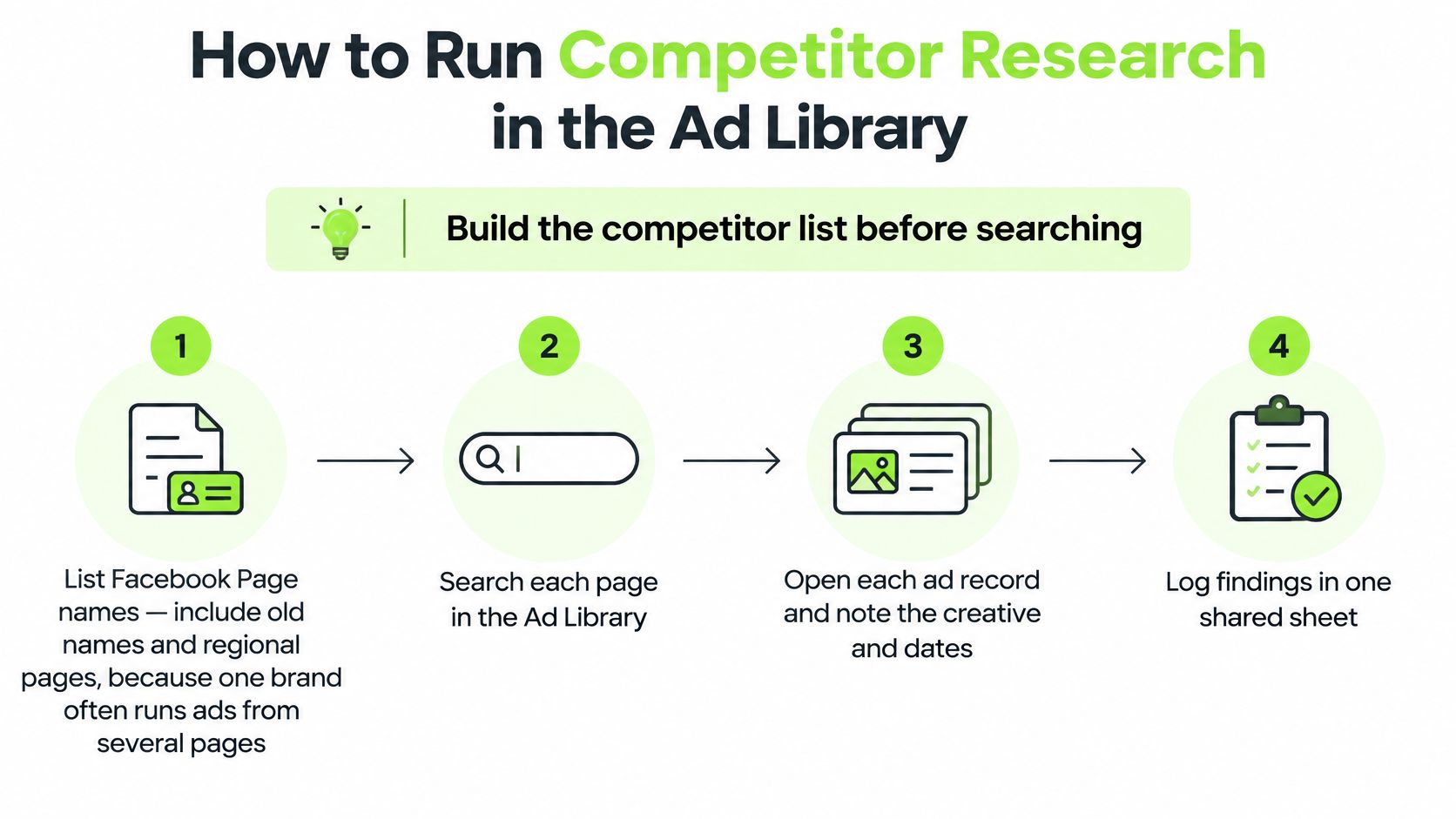
Build the competitor list before searching. Start with advertiser identity, not a collection of interesting images. Otherwise, you can miss regional Pages, mix unrelated advertisers with similar names or mistake a partial search for a complete brand portfolio.
Use this process as the collection workflow.
Collect records in a repeatable order
-
Map the advertiser's Pages. Write down current names, known former names and regional Pages. Keep the Page identifier when available so a name change doesn't split the same advertiser into unrelated entries.
-
Choose the country and category. Treat each market as a separate search scope. Meta's advertising-transparency documentation describes availability in more than 200 countries and territories, but that breadth doesn't make a single country selection a global result.
-
Search names before broad product terms. Start with the identified Page, then use product keywords to discover additional relevant records. For supported API retrieval, Meta's archived-ad API documentation permits searching up to 10 Facebook Page IDs in a request; record the request parameters alongside the output.
-
Inspect the active portfolio first. Establish what is currently visible before checking inactive records where retention allows. Don't promise yourself a complete testing history from the inactive results.
-
Capture the actual evidence. Record the ad identifier, displayed start date, copy, creative reference, destination URL, call to action and format. Keep the original snapshot reference so another analyst can inspect the material behind your description.
-
Group related creative variants. Compare copy, visual treatment, offer and destination before assigning a variant group. Repeated wording across separate ad records isn't sufficient evidence of separate campaigns or greater budget.
-
Record the observation time. Distinguish the library's published start date from the date you first encountered the record. If a search fails, log the failed retrieval instead of turning it into an advertising-status change.
-
Repeat the same search method. Keep Page identifiers, market selections and filtering rules stable. When you change the method, annotate the change so later comparisons don't confuse broader collection with increased advertiser activity.
Keep automation within the public dataset
The archived-ad API and an advertiser's private Marketing API serve different purposes. Programmatic retrieval can make your public-record collection reproducible; it doesn't grant access to another business's campaigns, ad sets or private insights.
Store collection parameters and original references, and follow the applicable access and storage terms. Don't design an export process around an assumed bulk-download capability.
For an interface walkthrough, use the video alongside your collection sheet.
After a complete pass, you should have a dated list of observed ads for each identified competitor and market. That's a defensible starting point for creative analysis, rather than a folder of examples with uncertain origins.
Reading Ad Records Without Overreading Them
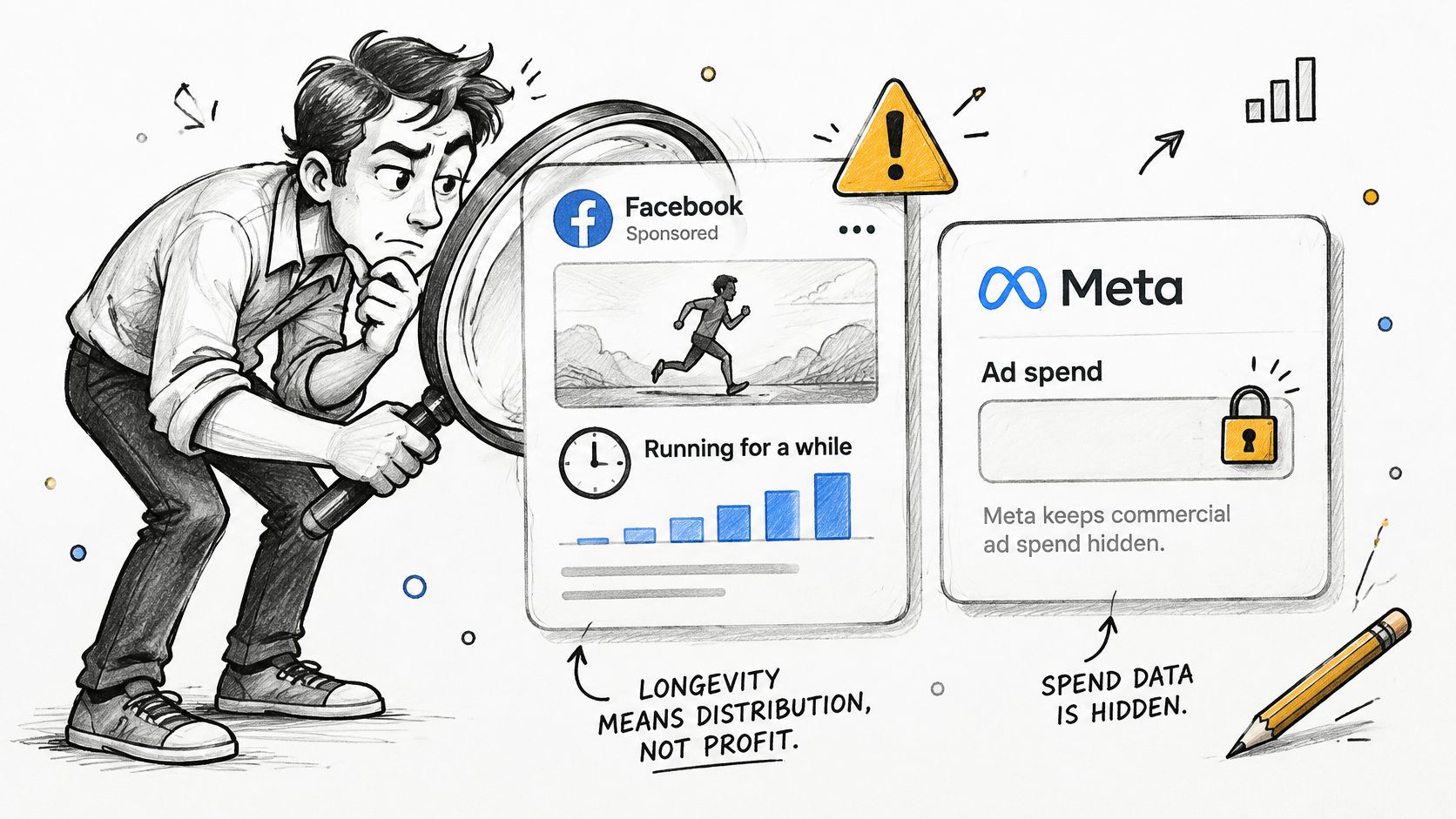
A long-running ad establishes continued distribution, not profitability. The distinction matters because marketers often turn duration into a claim about sales without observing any sales evidence.
Even political-ad disclosures have limits. An Internet Policy Review analysis of political-targeting transparency describes broad spending and reach ranges and targeting disclosures that don't expose the actual audience or optimization method. More disclosure doesn't automatically make campaign performance reconstructable.
The useful analytical task is to identify which claims remain hidden.
Give each conclusion an evidence level
- Observed fact. The creative emphasizes free shipping, the destination is a bundle page, or the record identifies Instagram distribution. Another analyst should be able to verify the statement from the saved evidence.
- Reasonable inference. Several related creatives introduce a different product benefit, suggesting that the advertiser may be testing a new message. Keep the wording conditional and name plausible alternatives.
- Unverifiable claim. The offer is profitable, the budget increased, the conversion rate improved or the advertiser used a particular audience-selection strategy. Public creative records alone don't establish these conclusions.
Meta doesn't publish spend for ordinary commercial ads. Our library therefore shows impression ranking, not impression counts or dollar amounts. An ordinal position can help prioritize inspection, but it isn't a measured gap between ads and shouldn't become an estimated budget.
Test competing explanations
Say a saved ad remains visible across repeated checks while its landing page changes. You can document continuity in the ad record and a change in the destination experience. You can't conclude that the revision improved return on ad spend.
Possible explanations include a new merchandising strategy, a site redesign or an attempted response to poor conversion. The public record may not distinguish among them.
Confidence grows when independent observations agree, not when an unsupported interpretation sounds certain.
Tag each analytical note with its evidence level and attach the supporting record. When several creative variants, destinations and product observations suggest the same positioning change, you have a stronger hypothesis about messaging. You still haven't established profitability.
This framework also makes creative research more actionable. Instead of instructing your team to copy a supposed winner, ask them to test a specific, observed mechanism: the demonstration, objection, offer presentation or transition from ad promise to product page.
Building a Dataset You Can Audit Over Time
The important question isn't how to find a competitor's ad. It's whether you can explain a comparison later, including how you collected the evidence and what your collection missed.
A study in Information, Communication & Society identifies limitations involving interface reliability, issue-ad identification, granularity and comparability. Those limitations make collection history part of the analysis, not administrative detail.
Organize your records so a colleague can reconstruct the reasoning without relying on your memory.

Preserve the record and its collection context
Keep the per-ad creative record, then add these fields:
- Search identity. The query, Page identifier and selected ad category.
- Market scope. The selected country and any relevant disclosure regime.
- Retrieval timestamp. When the collection occurred, including the time zone.
- Observation history. First-seen and last-seen dates within your collection.
- Observed status. The status displayed during a successful retrieval.
- Variant group identifier. Your grouping of related creative executions.
- Evidence reference. The original record, preserved snapshot or permitted media reference.
First-seen is a property of your dataset. It isn't necessarily a launch date. Last-seen is similarly an observation boundary, not a confirmed campaign end.
Keep a separate change log. When copy, creative or a destination changes, append a dated event rather than overwriting the prior value. For unsuccessful or incomplete retrievals, preserve an unknown observation instead of assigning inactive status.
Compare markets without inventing precision
Don't add impressions together to calculate unique reach. Repeat exposure and overlapping campaigns prevent that arithmetic from establishing distinct people reached. If targeting disclosures are aggregated weekly, don't assign the aggregate to an individual ad as though it were campaign-specific.
For permitted automated collection, Stella Proxies' web scraping best practices offers operational context. Apply collection discipline alongside platform terms, access restrictions and an explicit log of failed requests; technical access alone doesn't establish permission or completeness.
Suppose observed creative longevity looks greater in Germany than in Brazil. Check archival rules, disclosure coverage and your collection history before attributing the difference to advertiser behavior. The apparent pattern may reflect which records remained retrievable.
A useful comparison therefore has separate judgments: what changed in the observed advertisements, and whether collection conditions were comparable. Keep those judgments distinct, and you can explain not just your conclusion but its limits.
Set Up Your First Competitor Watchlist
Start with a small group of direct competitors whose products, customers and sales markets resemble yours. A focused watchlist is easier to maintain and more useful than a large collection of vaguely relevant stores.
Use the competitor ad tracking guide to organize the recurring checks, then assign someone responsibility for reviewing changes.
Put the watchlist into operation
-
Identify the relevant Pages. Choose your initial competitors and record every associated Facebook Page you can verify. Add a short reason each brand belongs on the list, such as overlapping products or a shared customer segment.
-
Save a dated baseline. Search the official library for each market where you sell. Preserve the search scope and records so later changes have a defined comparison point.
-
Add the stores to Brandtracker. Our tracker records snapshots of a store's traffic and advertising activity and can send email notifications when something changes. Use notifications to decide what deserves inspection, not as automatic proof of a strategic shift.
-
Opt into the weekly report. It covers stores adding the most ads, the fastest traffic growth, the biggest ad peaks and the newest winners, and can arrive by email every Monday. Treat those labels as discovery prompts, not audited statements about profitability.
-
Sign in with your work email. We email a six-digit code. There's no password or payment card required, so collaborators can join without managing a trial subscription.
Make review a habit
Review the watchlist monthly. Compare the current snapshots with the previous month's, add newly verified Page names and remove brands that no longer match your market.
End each review with a concrete research decision: a creative angle to test, a destination to inspect or a hypothesis that needs stronger evidence. The watchlist should help you choose better questions, not merely accumulate more saved ads.
AdLibrarySpy offers free Meta creative search, store context, shared research tools and competitor snapshots to help you maintain an evidence-based watchlist. Visit AdLibrarySpy, add your relevant competitors and save a dated baseline before interpreting their next advertising change.
More guides
Try AdLibrarySpy free
Search millions of stores and real Meta ads. No card, no trial — sign up with just your email.