Shopify stores database
Shopify Stores Database: What It Holds and How to Use It
Learn what a Shopify stores database contains, how its records are built, how to filter and investigate stores, and where the data falls short.
Updated October 26, 2026
You're building a brand in a crowded niche, and the same rival keeps appearing in your searches and social feeds. Before you study its products or copy its advertising approach, you need to answer a simpler question: is this a relevant competitor, or just a store with a polished website?
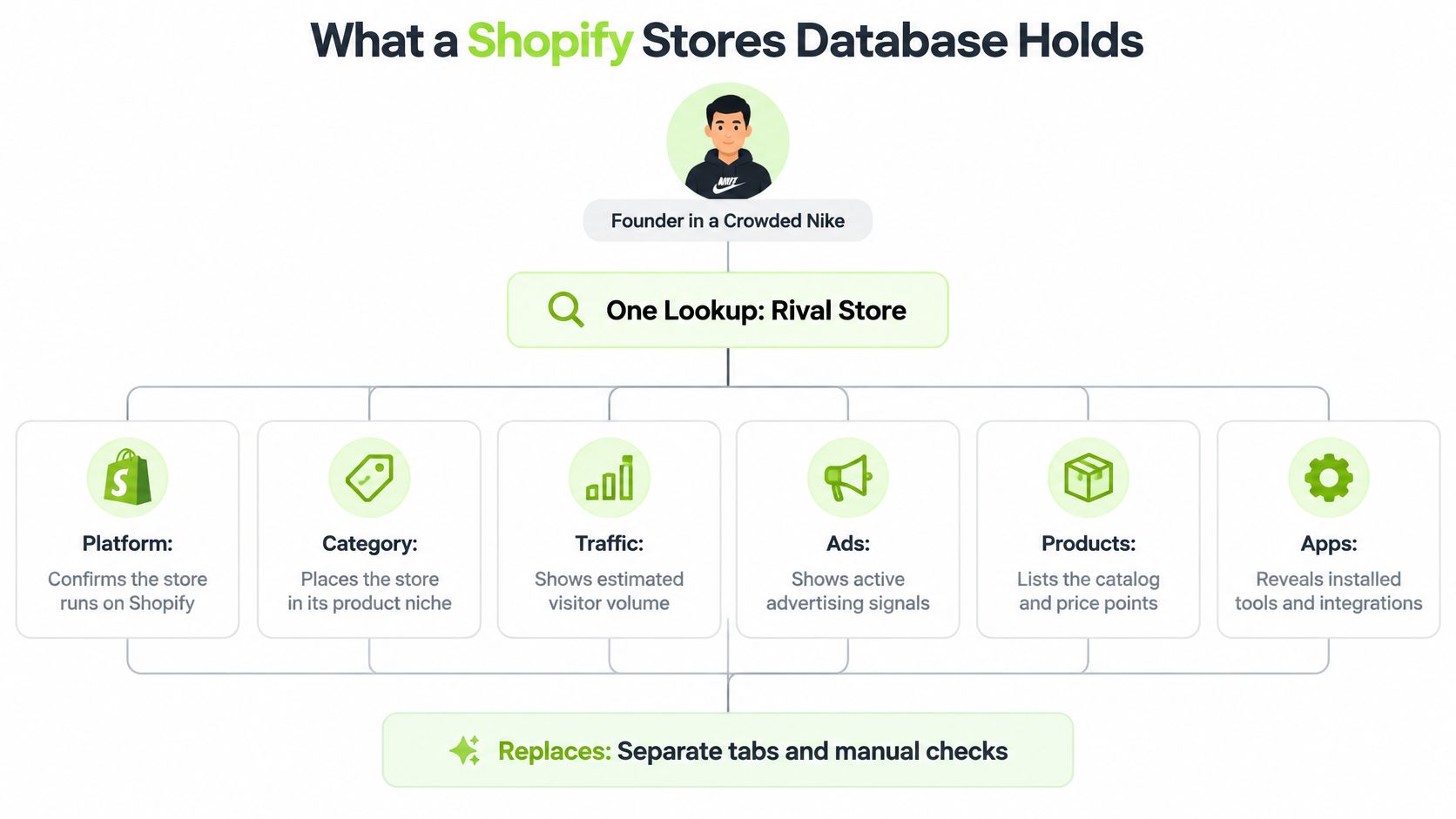
A Shopify stores database brings the store's platform, traffic, advertising, products, and detected tools into one lookup. The useful part isn't just finding the store. It's understanding which details were observed, which were estimated, and when each was collected.
Table of Contents
- What a Shopify Stores Database Holds and How Its Records Are Built
- How Store Data Is Collected and Where Access Stops
- Why Store Counts Disagree Across Databases
- Filtering Stores Down to a Shortlist
- How to Investigate a Store Step by Step
- What the Data Cannot Tell You and How to Verify a Store
What a Shopify Stores Database Holds and How Its Records Are Built
Say you sell skincare and want to investigate a rival before choosing your next product category. Instead of opening separate tabs for traffic estimates, advertisements, product pages, and technology checks, you open a store record that brings those sources together.
A Shopify stores database is an index with one record per Shopify storefront, assembled from several sources. Think of that record as a research file, not a single report produced by one measurement system.
In our collection process, the PlatformDTC market index supplies store records, SimilarWeb supplies traffic information, the Meta Ad Library supplies advertising records, and each store's public Shopify feed supplies product information. Those sources answer different questions, so their fields shouldn't receive the same level of trust.
Fields in a Shopify store record and how far to trust them
| Field | What It Tells You | Source | How to Treat It |
|---|---|---|---|
| Platform detection | The store runs Shopify | Technical detection of storefront signals | Observed; confirm the host is live |
| Category | The business group the store is filed under | Index classification | Classification; can be broad |
| Monthly visits | Estimated traffic for the exact store host | SimilarWeb | Estimate; compare trends, not exact values |
| Growth | Whether visits are rising or falling | SimilarWeb trend | Directional signal |
| Visitor countries | Where the store's traffic originates | SimilarWeb | Estimate |
| Apps and tracking pixels | Which tools the store runs | Storefront detection | Observed at capture date |
| Live and peak Meta ads | Current and highest observed advertising activity | Meta Ad Library | Observed presence, not spend |
| Top products and prices | Catalogue from the public product feed | Store's public Shopify feed | Observed at capture time |
| Average order value | Typical order size | Verified transaction data or a documented merchant disclosure | Leave blank unless source verified |
| Revenue, ad spend, ratings | Not provided by the platform | Not modelled | Absent; source elsewhere |
Our platform provides no modelled revenue, advertising spend, or ratings. A blank average-order-value field shouldn't be filled by multiplying catalogue prices or guessing how many products customers buy.
The breadth of Shopify makes this kind of directory useful. According to Marketplace Pulse's analysis of Shopify's disclosure, Shopify accounted for 14% of U.S. e-commerce in 2025, up from 12% in 2024.
That market share explains the interest in mapping Shopify storefronts, but it doesn't make every store equally relevant to your business. A directory helps you locate candidates. The evidence inside each record helps you decide which candidates deserve attention.
The diagram shows how separate observations can sit inside a single store file.
Read the record through an evidence ladder
The first rung is publicly observed information. The domain resolves, the storefront loads, and a product page exists. These are direct observations, although they remain tied to the time someone checked them.
Next comes technically detected information. A script, asset, or other storefront signal indicates Shopify, an app, or a tracking pixel. Detection describes a technical footprint rather than the merchant's complete internal setup.
The remaining rungs require more interpretation:
- Measured information: Visits and visitor countries come from a traffic measurement provider. Read the methodology carefully, because a measurement product can still supply modelled estimates rather than the merchant's own analytics.
- Inferred information: A classification or model draws a conclusion from available inputs. A category label can help organize stores without precisely describing every product the merchant sells.
This ladder isn't a ranking in which every observation is useful and every inference is bad. It tells you what kind of claim you can make. A category estimate can be useful for discovery, while a captured product price can be unsuitable for a decision if it's stale.
Keep the dates attached to the fields
Your skincare rival's product feed might have been captured before its latest launch, while its traffic field covers a more recent reporting period. Reading both as current would create a misleading picture of the business.
Keep each source's observation date or reporting period beside its value. For products, preserve the capture date; for traffic, preserve the reporting period; for advertisements, preserve the relevant observation and run dates.
Reading rule: A blank field means no available data, not a measured value of zero.
Missing advertising media doesn't prove that a store has never advertised. Missing traffic doesn't prove that nobody visits it.
Your first research skill is to sort each field into observed, estimated, or missing. When fields conflict, prefer the evidence closest to the specific question you're answering, then check whether its date still makes it relevant.
How Store Data Is Collected and Where Access Stops
Authorized merchant data and public discovery are separate collection paths. Admin API access requires merchant authorization; finding a public storefront doesn't grant access to its orders, customers, or private records.
For authorized collection, Shopify's GraphQL Admin API rate-limit documentation specifies restore rates of 100 cost points per second for Standard, 200 for Advanced Shopify, 1,000 for Shopify Plus, and 2,000 for Commerce Components, with a 1,000-point maximum per query. The quota applies to each app–store pair, not to a universal pool shared across every store.
Collection limits affect completeness
A responsible pipeline requests narrowly scoped fields, records requested and actual query cost, and backs off before exhausting its allowance. Smaller product pages can keep queries manageable, while saved pagination cursors allow interrupted collection to resume.
Public collection has different boundaries:
- Public pages and feeds: HTML, structured metadata, catalogue pages, and permitted feeds can support discovery without exposing private merchant records.
- Storefront API access: Shopify's Storefront API documentation describes a 1,000 complexity ceiling for tokenless access, alongside constraints on automated traffic and checkout creation.
- Collection infrastructure: Stella Proxies' guide to stable scraping proxies for data teams offers operational context, but proxies don't create authorization or justify bypassing access controls.
Record the endpoint, authorization state, retrieval time, pagination status, and collection errors alongside the extracted fields. A blocked request or interrupted sync should produce an incomplete collection status, not an empty catalogue presented as fact.
For a practical research workflow, use our guide to researching competitors through public evidence. Keep the question narrow: what can you legitimately observe, and what remains unavailable?
Why Store Counts Disagree Across Databases
Shopify says it supports millions of businesses across approximately 175 countries, according to its company overview. That is a merchant-scale statement: it describes businesses using Shopify, not the number of publicly reachable storefront domains a crawler can find on a given day.
Each store record works like a file assembled from several sources. One source may supply the platform signal, another the traffic measurement, another the ads, and another the product feed. Before comparing totals, check which unit the publisher counted: live websites, historical detections, storefront instances, businesses, or every record retained in an index.
Published Shopify store totals and what each one counts
| Source | What It Counts | Published Figure |
|---|---|---|
| BuiltWith | Websites detected using Shopify | 7,231,024 websites, as listed by BuiltWith |
| AdLibrarySpy index | Stores held in its broader index, separate from an official Shopify-only census | 14.7 million stores |
| Shopify company | Businesses using the platform, a merchant count rather than a domain count | Millions of businesses in approximately 175 countries |
A total without a published counting method is hard to place on this table. It may mix dormant stores, duplicate hosts, development instances, and live shops, or it may exclude all of them. Precision in the number does not settle that question.
Different counting rules produce different totals
A merchant and a storefront are different units. One brand can run separate regional shops, a wholesale store, and a consumer-facing store while remaining a single business in Shopify's sense.
Other gaps come from maintenance and detection choices:
- Dormant or temporary stores: an index may keep a record after trading stops or after a short campaign ends.
- Subdomains and regional domains: separate hosts can appear as separate records even when one team operates them.
- Detection criteria: publishers accept different technology signals and revisit domains on different schedules.
- Missing evidence: some records keep the store but omit unavailable traffic, ads, or product fields.
AdLibrarySpy counts only the Shopify stores in its own index that match a filter, and it leaves out missing data rather than estimating it. Its Shopify figures describe the stores it tracks, while the broader all-store index figure should stay labelled as an all-store index figure.
The practical question is whether a directory gives enough relevant, current records to support a decision. Arlo Inc.’s guide to turn ecommerce analytics into profitable growth frames the same distinction in commercial terms: collecting records is separate from making a sound decision with them.
Compare totals only when their definitions, detection methods, and observation dates align.
If those conditions are unavailable, treat the totals as descriptions of different datasets rather than rival measurements of one population.
Filtering Stores Down to a Shortlist
Store filters and the question each one answers
| Filter | Question It Answers | Example Setting |
|---|---|---|
| Platform | Is the store on Shopify or another platform? | Shopify only, to keep the list comparable |
| Category | Which niche does the store sit in? | Health & Beauty, then supplements |
| Traffic | Does the store receive a relevant level of attention? | A middle traffic band suited to your comparison |
| Growth | Is attention rising or falling? | Rising trend only |
| Country | Where does the store's traffic sit? | One target market |
| Installed apps | Which apps does the store run? | A review or subscription app |
| Tracking pixels | Which ad and analytics tools does it use? | A Meta pixel, as a paid-social research clue |
Filtering works best when you ask a business question rather than browse until a familiar logo appears. For a supplement brand, that question might be: which stores address my target market, attract growing attention, and appear equipped for subscription purchases?
Start with category and country. Check whether the country filter describes the business's location or its visitors' locations, because those aren't the same thing.
Stack filters in the order of relevance
Next, select a traffic band that matches the stores you can realistically learn from. A large general retailer may attract substantial attention but offer little guidance for a focused supplement launch.
Add a rising traffic trend, then a technology requirement such as a subscription app or Meta pixel. Leave technology until later so that an incidental tool choice doesn't decide your competitor set before you've checked commercial relevance.
A sensible supplement-brand workflow looks like this:
- Establish the niche: Choose the closest available health category, then inspect whether the results really sell supplements.
- Choose the market: Retain stores with relevant visitor-country coverage rather than assuming the business address identifies its audience.
- Look for momentum: Prefer a sustained rising trend to an isolated traffic jump.
- Add a useful technical clue: Use a subscription app to investigate replenishment models, or a Meta pixel to identify candidates for advertising research.
Open the remaining stores individually. A pixel is a reason to inspect the advertising evidence, not confirmation that the merchant currently runs paid-social campaigns.
Keep an unfiltered comparison set
Each extra condition can exclude stores with missing fields. A store without a traffic observation might disappear from a traffic-filtered result even though it competes directly with you.
Our filtered counts include only indexed Shopify stores matching the selected conditions, and missing data is left out rather than estimated. A zero-result list can therefore reflect data gaps or overly narrow criteria, not an empty market.
Save the filter settings and a broader comparison list. Rerun the search monthly as a research routine, then separate newly indexed stores from established stores whose recorded attributes have changed.
How to Investigate a Store Step by Step
A useful investigation produces a documented reason to study a store, not a verdict that it's successful. Work through the record with a specific question, such as whether the merchant's product positioning and advertising approach are relevant to your market.
Build a store-level research note
-
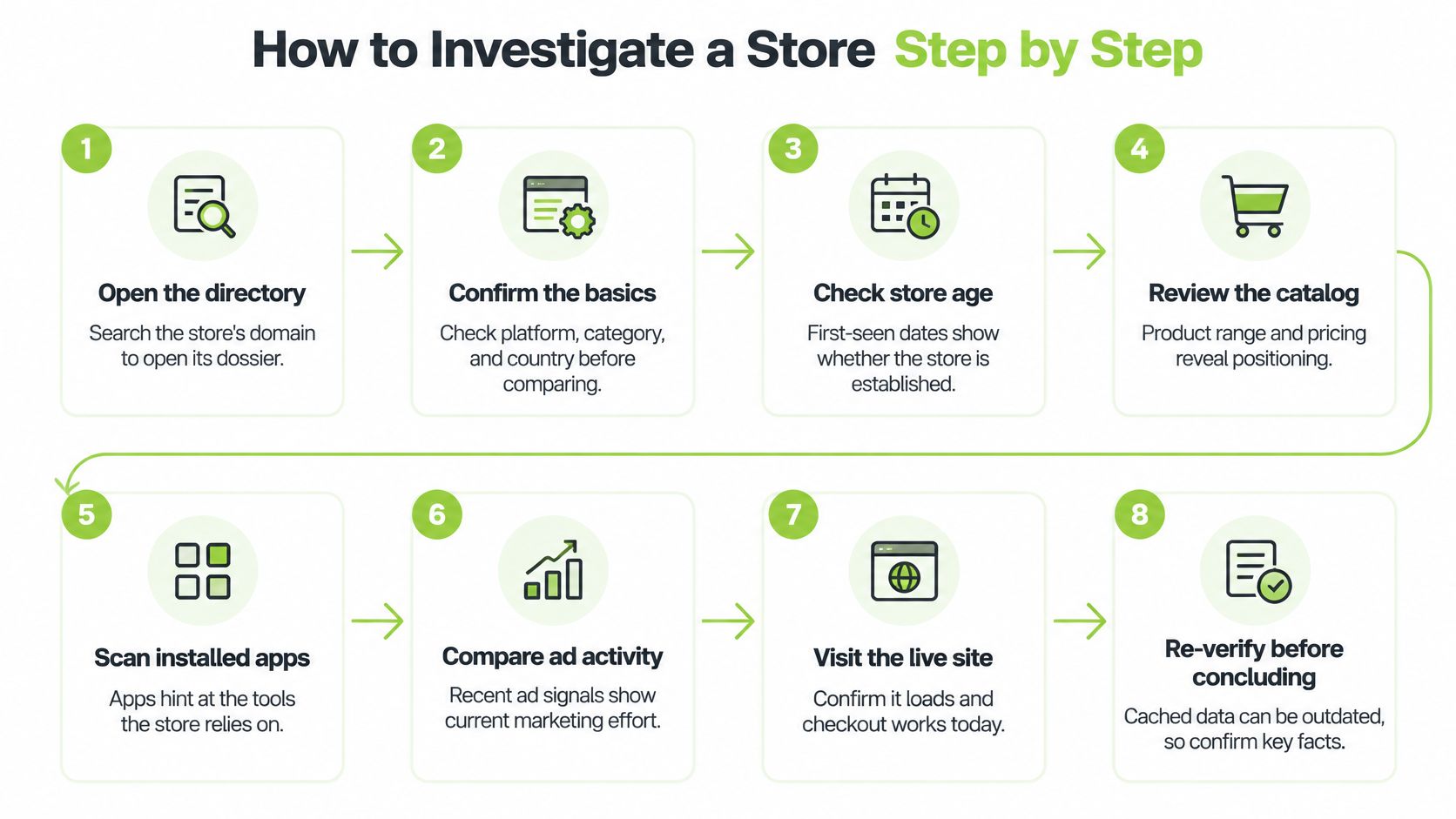
Open the directory or search the domain. You can browse the Shopify store directory or search a domain to open its dossier. Use the exact host you intend to investigate so you don't confuse a regional storefront with the main website.
-
Confirm the basics against the live site. Check platform, category, and country, then make sure the host resolves to a functioning storefront. Read the shipping and currency information before treating the store as a direct market competitor.
-
Read the traffic history, not just the latest value. Look for a sustained direction and distinguish a brief spike from a longer change. Write down the period you reviewed so another researcher can reproduce your interpretation.
-
Compare visitor countries with your target market. A store may attract visitors from places it doesn't prominently serve. Check whether its shipping offer, language, and currency support the audience you're interested in.
-
Review apps and tracking pixels. Use the detected stack to form questions about subscriptions, reviews, retention, or advertising measurement. Our guide to identifying the apps a Shopify store uses helps distinguish visible technical clues from assumptions about the merchant's setup.
-
Inspect live and peak Meta advertising activity. Read the copy, landing pages, formats, and available run dates rather than judging the store by its ad count. A long-running creative deserves examination, but longevity alone doesn't explain why the advertiser retained it.
-
Browse the products view. Review catalogue breadth, price positioning, and product groupings, then note the feed capture date. Open the relevant live product pages before recording a current offer or comparing a bundle.
-
Assign confidence to each finding. Record the observation date, evidence type, and any unresolved question alongside your conclusion. Open similar shops to test whether the pattern is distinctive or merely common within the category.
Use the visual checklist as a reminder to return to the live storefront before making a decision.
Turn observations into a testable hypothesis
Suppose a candidate store has a rising traffic trend, a detected Meta pixel, and creatives that remain visible across repeated checks. Its landing pages consistently promote a replenishment bundle.
That supports a narrow hypothesis: the merchant is maintaining advertising around a repeat-purchase offer while recorded attention rises. It doesn't establish that advertising caused the increase, that the bundle sells well, or that the business makes a profit.
Your next research note should name the gaps. You still need to understand actual sales, acquisition economics, and advertising outside Meta, none of which can be established by combining those public observations alone.
What the Data Cannot Tell You and How to Verify a Store
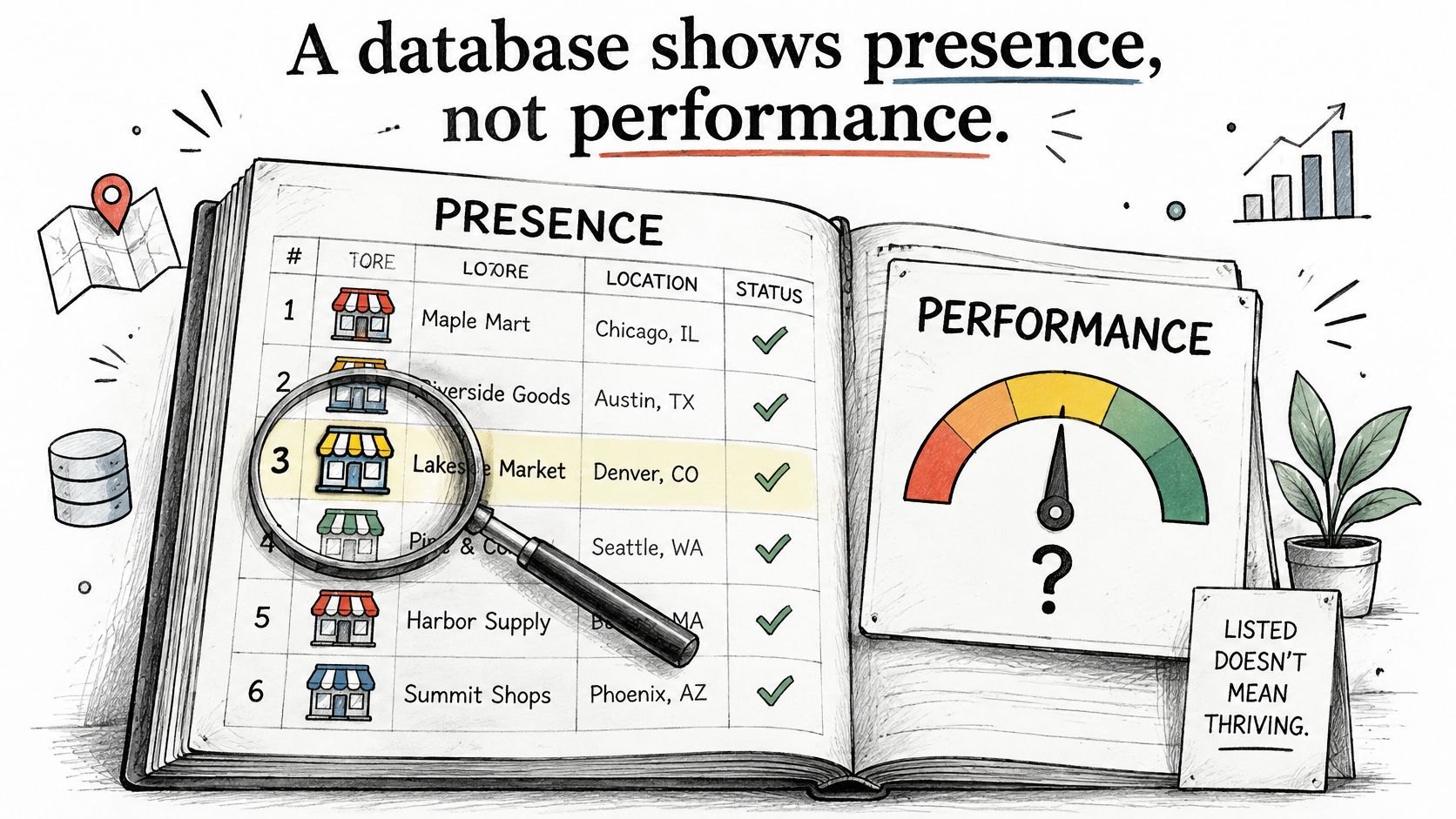
A database shows presence, not performance.
Keep that distinction visible whenever you compare stores. A well-populated record can feel authoritative because it contains many fields, even when none directly measures commercial results.
The difference between a store file and a performance assessment is worth keeping in view.
What each database signal shows and what it does not prove
| Signal | What It Shows | What It Does Not Prove |
|---|---|---|
| Technology detection | The store runs a given app or pixel | That the app drives sales |
| Traffic estimate | Approximate visits to the exact host | Revenue or profit |
| Live Meta ad | The ad was visible in the Meta Ad Library | Spend, return, or that the ad works |
| Similar store design | Possible shared templates or AI workflows | Copied strategy |
| Product listing | The item was in the feed at capture | Current stock or real sales |
| Store total | Stores the index tracks | Shopify's official count of active stores |
A detected app may be installed without being configured correctly. Traffic for an exact host shouldn't be read as a complete audience total covering separate regional domains and subdomains.
Meta coverage also leaves out TikTok and Google advertising. A visible Meta creative tells you what you can inspect, not the merchant's total media mix.
Treat resemblance as a question, not a conclusion
Shopify's reporting says 75% of store owners used AI tools in 2025, according to its AI trends overview. Similar copy or imagery can reflect shared tools and workflows rather than copied strategy.
Compare the substance of the offer instead: product specifications, bundles, shipping terms, guarantees, and landing-page claims. For trust-related checks, use our guide to assessing whether an online store is legitimate, rather than treating a technology footprint as proof of reliability.
Use the accompanying video alongside your own checks, not as a replacement for inspecting the candidate store.
Verify a pattern before acting on it
Choose a shortlisted store and compare its traffic direction with relevant category peers. Then align available product, price, and advertising observations by date to see whether the changes actually overlap.
Check creative longevity and visitor-country fit, but don't count related observations as independent evidence. A detected Meta pixel and a Meta advertisement both relate to advertising infrastructure; together, they still don't verify demand.
As a working decision rule, require agreement across independent evidence types, such as audience direction, live offer changes, and sustained advertising observations. If they conflict, place the store on a watch list and schedule another check rather than forcing a conclusion.
A dossier brings traffic history, visitor countries, ads, products, apps, and similar shops together. Use that convenience to generate hypotheses that sales data, consented customer data, or direct testing must confirm before you move budget.
AdLibrarySpy brings store discovery, traffic history, Meta advertising records, product feeds, and detected tools into a searchable workspace. Visit AdLibrarySpy, open a competitor's dossier, and build a shortlist with a source, date, and confidence level attached to each finding.
More guides
Try AdLibrarySpy free
Search millions of stores and real Meta ads. No card, no trial — sign up with just your email.